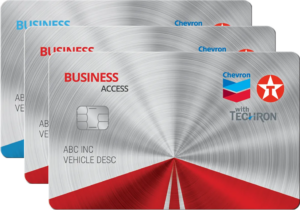
Manage your cards, drivers, transactions, and payments right from your phone, virtually wherever business takes you. Features and availability vary by card program.
In a small business, every second is precious. You don’t have time to waste installing new software or learning new programs. Not when there are invoices to pay, clients to meet and a thousand other tasks that need to get done now.
Mobile access can help, especially when managers need to make decisions while drivers, jobs, and vehicles are already on the road. According to the Pew Research Center, about 91% of U.S. adults owned a smartphone as of 2025, so a phone is often the device a manager already has on hand.¹ Fleet management apps, available for your smartphone or tablet, are designed to help save time for managers, driver information, purchase data and fleet visibility while they are away from the office.
For many businesses, a mobile fleet app is part of the same day-to-day workflow as a fleet tracking mobile app. Managers often need quick access to driver activity, vehicle-related expenses, fuel purchases, account status, and reporting from the road. GPS tracking tools may show vehicle location, routes, and real-time movement, while a fuel-card mobile app can help connect that fleet activity to spending, card controls, and payment decisions.
- 24/7 Account Access: Problems with fleet cards or drivers can come up quickly, and may need to be solved just as quickly. With a mobile app, you may be able to address many of these problems as they arise. Don’t trek back to the office just to access your accounts. Pay bills, activate cards and check your credit, from the road or job site, depending on your card program and account permissions.
- Versatility: Stop lugging around a bulky, fragile laptop to work sites, or worse, chaining yourself to your office computer. Many mobile apps work on both smartphones and tablets. In many cases the interface is the same on both.
- Simplicity: Touch screens are often quick to learn and intuitive to use. That can reduce the need for additional training or appointments with IT. You can often take action in seconds with just a tap or swipe of your finger.
What should I look for in a mobile app?
Many fleet apps focus on drivers, GPS tracking, or vehicle location, but decision-makers also may need mobile tools for account controls, fuel-card activity, payments, and reporting. The right mobile fleet app for your business should make everyday decisions easier for fleet managers, whether they are checking driver purchases, reviewing account details, monitoring fuel costs, or comparing activity across fleet vehicles.
Instead, look for an app that provides the services and features you need, such as:
- Bill Pay: View and make payments right from your phone or tablet, which can help you avoid late fees or last-minute trips to the office to pay the bills.
- Credit Monitoring: Designed to help reduce the risk of drivers encountering unexpected card declines at the pump. Keep track of your credit balance so you are less likely to go over your limit.
- Card Management: Activate, reissue and terminate cards from your account. Activate cards as needed to help minimize fueling disruptions, or terminate cards when unauthorized purchases are detected.
In-depth purchase detail. Stay on top of what your drivers are buying, where fleet purchases are happening, and whether fuel activity fits the job, route, or vehicle. This kind of detail can help you spot possible fraud or misuse sooner, so you can look into it before it grows. Earlier visibility can matter: the Association of Certified Fraud Examiners reports in its 2026 global study that a typical occupational fraud case lasted 12 months before it was detected.²
Fleet visibility. Look for tools that help you understand what is happening across drivers, cards, vehicles, and locations. Even when a mobile app is focused on fuel-card management rather than GPS tracking, it should make fleet activity easier to review from a phone or tablet.
Alerts and account controls. Mobile alerts can help managers respond quickly to unauthorized purchases, card issues, credit-limit concerns, or payment needs. Alert types and account controls vary by card program. Fast access can matter when drivers are on the road and some decisions may not be able to wait until someone is back at the office.
Reporting and analytics. A useful fleet management app should make data easy to act on. Purchase details, fuel consumption patterns, driver activity, and exception reports can help reveal waste, fraud risk, and opportunities to improve efficiency. Fuel cost is worth reviewing over time rather than at a single moment, because pump prices move: the U.S. Energy Information Administration publishes average retail gasoline and diesel prices weekly, and those averages vary by region and from week to week.³ Fuel waste can be significant across the vehicle population: the U.S. Department of Energy’s Alternative Fuels Data Center reports that U.S. passenger cars, light-duty trucks, and medium- and heavy-duty vehicles together consume more than 6 billion gallons of fuel a year while idling.⁴
Integration with fleet management workflows. If your business also uses fleet tracking software, telematics, dispatch tools, route planning, or maintenance systems, your mobile fuel-card tools should support the same operational rhythm: fast checks, clear records, and better-informed decisions.
Mobile platform access. Confirm that the app works on the mobile devices your team already uses, including iOS and Android phones or tablets, and that account access is protected for managers and authorized users. The Federal Trade Commission advises businesses to require multi-factor authentication to protect sensitive information, so it is worth checking which sign-in options an app supports.⁵ The National Institute of Standards and Technology makes the same point to small businesses, noting that if a password is compromised, multi-factor authentication creates a second barrier that makes it much harder for a threat actor to access your systems and data.⁶
How A Mobile Fleet App Supports Fleet Tracking Workflows

A fleet tracking mobile app often helps businesses see where vehicles are, which routes drivers are taking, and whether activity is happening in real time. Electronic recordkeeping is already routine in parts of the industry: the Federal Motor Carrier Safety Administration requires most drivers who keep records of duty status to use a registered electronic logging device, and notes that an ELD can run on a smartphone or other wireless device that meets the rule’s technical specifications.⁷ A mobile fuel-card app supports a related part of that workflow: it helps managers connect activity on the road to fuel spending, card status, purchase detail, and account decisions.
When a driver needs to fuel up, a manager may need to check available credit, review recent transactions, confirm card status, or respond to a purchase issue from a smartphone. That kind of mobile access can give small businesses more control over the moving parts of fleet operations, especially when vehicles, jobs, and employees are spread across multiple locations. Mobile account access is meant to be used when it is safe to do so, not while driving. The National Highway Traffic Safety Administration notes that employers can be held accountable for employees who are using a cell phone and are involved in a crash as part of their work, and that federal agencies including the Federal Motor Carrier Safety Administration have adopted rules prohibiting texting or using hand-held cell phones while driving.⁸
For businesses that also use GPS fleet tracking, route optimization, dispatch software, telematics devices, or maintenance tools, mobile fuel-card management can add another layer of visibility. Vehicle tracking may show where a truck is; fuel-card data can help show what was purchased, when it happened, and whether the transaction fits the job, route, or account rules.
Mobile Fleet App Features That Improve Visibility
The right mobile fleet app should make fleet information easier to see and act on. A manager should be able to open a dashboard, review account activity, check driver purchases, and respond to issues without waiting to get back to a desktop computer.
Useful features may include secure account access, mobile alerts, payment tools, card controls, purchase detail, reporting, and data that can help managers spot unusual activity. For businesses comparing fleet management software or a GPS tracking app, it can also help to think about how each platform supports visibility across vehicles, drivers, fuel costs and day-to-day operations.
Getting Your Fleet Management App: A 60-Second Guide
- Find The App From The Business Website
Some companies include App Store and Google Play buttons on their websites so users can go directly to the correct mobile app page. - Or Search For Fleet Smarthub From Your Mobile Device
Open the Apple App Store on an iOS device or Google Play on an Android phone or tablet. Google’s Play Store help pages describe the same path on Android: open the Google Play Store app or go to play.google.com, search or browse for the item, select it, then select Install and follow the on-screen instructions.⁹ Tap “Search,” type “Fleet SmartHub,” then select the correct company name when it appears. - Review The App Page Before Downloading
Check the app description, supported devices, available features, ratings, and update information so you can confirm it is the right app for your business account. - Tap The “Get” Or “Install” Button
Follow the on-screen instructions. Downloading the app usually takes only a short time, and installation often starts automatically on a supported iOS or Android mobile device. Apple notes that completing a download may also require authenticating with Face ID, Touch ID, or an Apple Account password.¹⁰ - Go Back To Your Home Screen
Your new Fleet SmartHub app should appear with all your other apps. Tap its icon to open it. Make sure you have your login information handy! - You’re Ready To Start Using Your App
¹ Pew Research Center, “Mobile Fact Sheet,” survey of 5,022 U.S. adults conducted Feb. 5-June 18, 2025, https://www.pewresearch.org/internet/fact-sheet/mobile/
² Association of Certified Fraud Examiners, “Occupational Fraud 2026: A Report to the Nations,” press release, May 12, 2026, https://www.acfe.com/about-the-acfe/newsroom-for-media/press-releases/press-release-detail?s=occupational-fraud-2026-a-report-to-the-nations-pr
³ U.S. Energy Information Administration, “Gasoline and Diesel Fuel Update,” weekly release, https://www.eia.gov/petroleum/gasdiesel/
⁴ U.S. Department of Energy, Alternative Fuels Data Center, “Idle Reduction,” https://afdc.energy.gov/conserve/idle-reduction-basics
⁵ U.S. Federal Trade Commission, “Cybersecurity for Small Business – Cybersecurity Basics,” https://www.ftc.gov/business-guidance/small-businesses/cybersecurity
⁶ National Institute of Standards and Technology, “Multi-Factor Authentication,” NIST Small Business Cybersecurity Corner, https://www.nist.gov/itl/smallbusinesscyber/guidance-topic/multi-factor-authentication
⁷ Federal Motor Carrier Safety Administration, “General Information about the ELD Rule,” https://www.fmcsa.dot.gov/hours-service/elds/general-information-about-eld-rule
⁸ National Highway Traffic Safety Administration, “Employer Programs,” Countermeasures That Work: Distracted Driving, https://www.nhtsa.gov/book/countermeasures-that-work/distracted-driving/countermeasures/other-strategies-behavior-change
⁹ Google Play Help, “Get Android apps & digital content from the Google Play Store,” https://support.google.com/googleplay/answer/113409
¹⁰ Apple Support, “Download apps on your iPhone or iPad,” published Feb. 4, 2026, https://support.apple.com/en-us/102590